
5-15-45 Digital Accessibility Tool
There’s time for accessibility
Summer 2026 UVM offered it’s first Basic Digital Accessibility course for employees. As a final project, CDCI Director, Jesse Suter, created a poster with recommendations for improving digital accessibility matched to how much time you have available. The information is available as a PDF poster and here on this site.
This tool was created for people at UVM who need ideas for quickly accessing information on digital accessibility. Most of the links are to resources created by UVM’s Office of Accessibility Services and hosted on the UVM Accessibility Hub.
The inspiration for this tool is the excellent TIES Center 5-15-45 Tool designed to increase collaboration between special and general educators, who often find themselves with little time to meet.
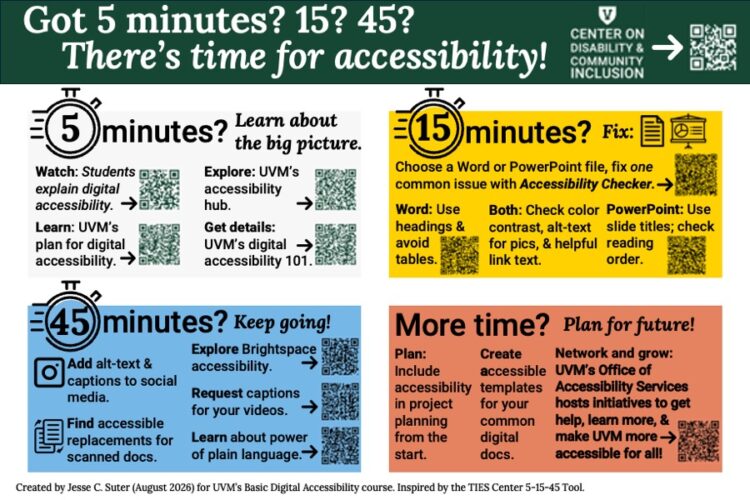
How much time do you have?
- Watch: Students explain digital accessibility (YouTube Video).
- Learn: UVM’s plan for digital accessibility.
- Explore: UVM’s accessibility hub.
- Get details: UVM’s digital accessibility 101.
Choose a Word or PowerPoint file you’re working on. Fix one common issue with the built-in Accessibility Checker.
- MS Word: Use headings and avoid tables.
- PowerPoint: Use slide titles, and check reading order.
- Both: Check color contrast, alt-text for pics, & helpful link text.
- Add alt-text & captions to social media.
- Find accessible replacements for scanned documents.
- Explore Brightspace accessibility.
- Request captions for your videos.
- Learn about the power of plain language.
- Plan: Include accessibility in project planning from the start.
- Create accessible templates for your common digital docs.
- Network and grow: UVM’s Office of Accessibility Services hosts initiatives to get help, learn more, & make UVM more accessible for all!